Last updated: October 26, 2026
A critical PHP2Shell vulnerability has prompted urgent security updates for PHP installations serving web requests. The two vulnerabilities, tracked as CVE-2026-109618 and CVE-2026-109619, could allow unauthenticated remote code execution under vulnerable conditions.
The PHP development team released security updates on October 21, 2026, for the affected supported release branches. A separate advisory published in October also addresses a configuration-dependent issue involving PHP session upload progress.
If you manage a WordPress website, operate a PHP application, or maintain a VPS or dedicated server, you should verify your PHP runtime’s patch status and take the appropriate security measures.
The key action is simple: check the PHP version serving your website, apply the relevant security update, and verify that the patched runtime is active.
For the authoritative release information, see the official PHP security advisory.
What Is the PHP2Shell Vulnerability?
PHP2Shell is the name used for two critical vulnerabilities in the PHP runtime that can potentially enable remote code execution (RCE).
Remote code execution is a security issue in which an attacker can cause a vulnerable system to execute code or commands remotely. Depending on the affected service’s permissions, a successful attack could put application files, credentials, stored data, and other server resources at risk.
The term unauthenticated means that exploitation may be possible without first logging in to a valid account.
These vulnerabilities affect the PHP runtime itself rather than being limited to one WordPress plugin, theme, or application. Consequently, updating WordPress core alone does not resolve the underlying PHP vulnerability.
The PHP project has identified multiple web-serving environments as potentially affected, including PHP-FPM, Apache with mod_php, php-cgi, FrankenPHP, and LiteSpeed. Actual exposure and exploitability depend on the environment and configuration.
PHP2Shell CVE Details
CVE-2026-109618: Remote Code Execution Through Memory Corruption
The first vulnerability involves PHP’s handling of an out-of-memory condition.
In simplified terms, a serious memory error can interrupt PHP while internal request data is only partially initialized. If cleanup routines subsequently treat that incomplete data as valid, memory corruption may occur and potentially lead to code execution.
The PHP project has highlighted Apache deployments using mod_php as particularly concerning because a demonstrated attack can trigger the issue before application code runs.
What administrators should know: Application-level checks cannot fully compensate for a vulnerable PHP runtime. The appropriate security update is essential.
CVE-2026-109619: Remote Code Execution Through Stale Internal State
The second vulnerability concerns internal request data that can remain referenced after the memory supporting it has been released.
Under certain conditions, a subsequent request handled by the same worker may encounter this stale state. This use-after-free condition can potentially lead to remote code execution.
What administrators should know: The risk is not necessarily limited to a particular application or plugin. PHP’s execution environment must be checked and updated.
For the technical details and official recommendations, consult the PHP security advisory.
Which PHP Versions Are Affected?
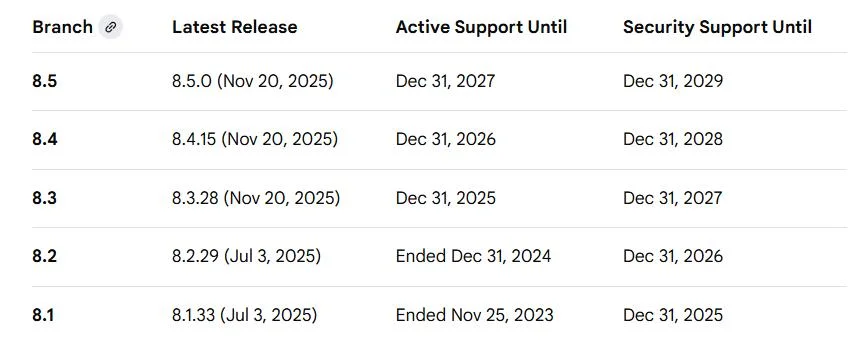
The PHP project released the following versions on October 21, 2026, to fix CVE-2026-109618 and CVE-2026-109619.
| PHP branch | Fixed release |
|---|---|
| PHP 8.5 | 8.5.12 |
| PHP 8.4 | 8.4.27 |
| PHP 8.3 | 8.3.36 |
| PHP 8.2 | 8.2.35 |
If your installation uses an earlier release in one of these branches, check the relevant vendor guidance and apply the appropriate security update.
PHP 8.1 and older branches no longer receive regular updates from the main PHP project. Some Linux distributions and commercial support providers may offer backported security patches, so verify your specific package’s status rather than relying only on its version number.
If a supported PHP upgrade is needed, confirm compatibility with your application and hosting environment before deploying it.
Important: The version shown by the command-line PHP executable may differ from the version used by your website. Verify the active web-serving runtime.
Which Server Environments Need Attention?
The PHP project’s advisory identifies the following web-serving environments as potentially at risk:
- PHP-FPM: Commonly used with Nginx, Apache, and other web servers.
- Apache
mod_php: Specifically highlighted by PHP as a higher-priority concern. php-cgi: CGI-based PHP deployments.- FrankenPHP: PHP application serving through the FrankenPHP runtime.
- LiteSpeed: Relevant to websites hosted on LiteSpeed-based infrastructure.
If you manage a VPS, dedicated server, shared hosting account, or managed WordPress service, do not assume that your installation is safe simply because you have not changed your website recently.
The runtime may be managed by your hosting provider, operating system packages, control panel, container image, or hosting platform.
Multiple PHP versions may also be installed on the same server. Updating one version does not necessarily update every website or service.
Additional PHP Security Advisory: CVE-2026-115560
A separate PHP advisory concerns CVE-2026-115560, an additional remote code execution issue involving session upload progress.
According to the PHP project’s guidance, this issue requires an uncommon combination of PHP configuration and application behavior. In particular, the application must change the session serialization handler at runtime before starting a session, while session upload progress remains enabled.
The PHP project recommends setting the following configuration until the issue is addressed in a regular bug-fix release:
session.upload_progress.enabled=0
This is a configuration-specific mitigation, not a substitute for updating PHP to address the two PHP2Shell vulnerabilities.
Administrators should review the official PHP security information for the latest status and implementation guidance. Confirm that the setting applies to the relevant web-serving runtime and that any required service restart has occurred.
How to Check Your Website’s PHP Version
If you manage a WordPress website, you can start by checking the version reported by WordPress.
- Sign in to your WordPress dashboard.
- Open Tools → Site Health.
- Select the Info tab.
- Expand the Server section.
- Review the PHP version.
You can also check your hosting control panel, such as the PHP settings for your domain, or ask your hosting provider to confirm the runtime version.
For a server that hosts several websites, verify each relevant PHP runtime and service. A version displayed in the command line may not match the version serving requests through PHP-FPM, Apache, or LiteSpeed.
Once you have identified the runtime, compare its patch status with the official PHP security guidance.
How to Protect a WordPress Website From PHP2Shell
1. Contact Your Hosting Provider
If your hosting provider manages PHP updates, ask whether the PHP runtime serving your website has been patched against CVE-2026-109618 and CVE-2026-109619.
You can ask:
- Which PHP version is serving my domain?
- Is the active runtime patched against both PHP2Shell vulnerabilities?
- Are any additional configuration changes required for my environment?
- Has the provider reviewed the latest guidance for CVE-2026-115560?
Request confirmation of the actual runtime and patch status.
2. Update PHP Through the Appropriate Method
For self-managed servers, use the approved update mechanism for your operating system, PHP package, hosting control panel, or container image.
Before changing production systems:
- Take a verified backup of the website files and database.
- Confirm that a recovery path is available.
- Test compatibility on staging when possible.
- Check critical pages, forms, integrations, scheduled tasks, and payment workflows.
- Verify the active PHP version after the update.
- Restart or reload the relevant services if required by your installation method.
On production systems, avoid untested changes. However, do not delay addressing a critical vulnerability unnecessarily.
3. Update WordPress Core, Themes, and Plugins
PHP2Shell is a runtime-level vulnerability, but application maintenance remains important.
- Keep WordPress core on a supported, secure release.
- Update themes and plugins from trusted sources.
- Remove unused themes and plugins.
- Review custom PHP code and third-party integrations.
- Check for additional security advisories affecting your application or hosting platform.
Remember that application updates and PHP runtime updates solve different problems. Both matter.
4. Review Logs if Your Website May Have Been Exposed
Patching does not prove that a previously vulnerable server was never compromised.
If your installation was exposed, review the available web server, PHP, authentication, and security logs for unusual activity. Investigate unexpected file changes, unfamiliar administrative accounts, suspicious processes, and unexplained outbound connections.
Preserve relevant logs and backups before performing extensive cleanup. If you find signs of compromise, contact your hosting provider or a qualified incident-response professional.
A website that loads normally is not, by itself, proof that its server is secure.
Does Cloudflare Protect Against PHP2Shell?
A web application firewall (WAF) or content delivery network can provide an additional layer of protection. Cloudflare has reported deploying WAF protections related to the PHP vulnerabilities.
However, the protection available depends on your service, configuration, traffic path, and applicable rules. A WAF does not prove that the origin server’s PHP runtime has been patched.
Do not treat a CDN, firewall, or WordPress security plugin as a replacement for the appropriate PHP security update.
Use these protections as part of a broader security strategy, while keeping the server software patched.
For more information, see Cloudflare’s PHP vulnerability protection update.
PHP2Shell Security Checklist for Server Administrators
If you manage a VPS, dedicated server, or hosting infrastructure, use this checklist to organize remediation.
- Identify all websites and services that execute PHP.
- Verify the PHP version used by each web-serving runtime.
- Prioritize exposed systems that lack the relevant security patches.
- Apply the vendor-approved security update.
- Confirm that the patched runtime is active.
- Review the additional guidance for CVE-2026-115560.
- Investigate suspicious activity if a system was exposed.
- Document the changes and any remaining risks.
- Keep a verified backup and a recovery plan available.
Where multiple PHP versions or server services exist, verify each one individually.
Frequently Asked Questions
What is PHP2Shell?
PHP2Shell is the name associated with two critical PHP vulnerabilities, CVE-2026-109618 and CVE-2026-109619, that can potentially enable unauthenticated remote code execution in vulnerable environments.
Which PHP versions contain the PHP2Shell fixes?
The PHP project released PHP 8.5.12, 8.4.27, 8.3.36, and 8.2.35 to address the two vulnerabilities. Check the official advisory and your vendor’s guidance for the correct update for your installation.
Are WordPress websites affected?
WordPress websites may be exposed when they run on a vulnerable PHP runtime. The issue is not restricted to WordPress, and updating WordPress core alone does not patch PHP.
Does Cloudflare completely fix PHP2Shell?
No. A WAF can provide additional protection, but it does not replace updating the PHP runtime or verifying the origin server’s patch status.
What is CVE-2026-115560?
It is a separate PHP security issue involving session upload progress that requires an uncommon configuration and application behavior. Review the official PHP advisory for the recommended mitigation and release status.
What should I do if my hosting provider controls PHP?
Ask the provider to confirm the PHP version serving your website and whether the relevant security patches have been applied. If the runtime remains vulnerable, request an urgent update or an appropriate supported alternative.
Final Recommendations
PHP2Shell highlights why website security depends on more than WordPress plugins, themes, and application code. The PHP runtime and the surrounding server infrastructure also need regular security maintenance.
If you own or maintain a PHP-powered website:
- Verify the PHP runtime serving your website.
- Apply the appropriate security updates.
- Review the latest PHP guidance for CVE-2026-115560.
- Confirm that the patched runtime is active.
- Investigate suspicious activity if your server was exposed.
- Keep your backups, application updates, and monitoring practices up to date.
Do not wait for a visible website problem before checking your security status.
At WPF Creatives, we recommend treating website security as an ongoing maintenance responsibility rather than a one-time task.
Have you checked the PHP version running your website recently?
Share this guide with WordPress developers, website owners, and server administrators who may need to review their PHP security.